
-

0 -

No fire or stove -

No dogs -

Good mobile signal -

Overview


The Community Space at Calverley Old Hall is available for community groups, businesses and individuals to use for regular or ad hoc events, meetings, creative workshops or talks.
The space is available to hire between 10am and 8pm, seven days a week, for a maximum of 25 people. It can be hired on an hourly, half day, full day or recurring basis. Your hire time must include all set up and pack down time required for your event, and access will not be possible outside of your event start and finish time.
The restoration of Calverley Old Hall and provision of this community space is made possible with The National Lottery Heritage Fund.

Facilities
- Five tables and 25 chairs in the main room.
- Kitchenette equipped with two kettles, a fridge, small plates, mugs, water glasses plus cutlery
- W.C. with accessible features
- Wifi is available
- Large screen with HDMI connection cables
- Two bicycle racks
- One parking space, ideal for unloading and loading any equipment. There is ample free on-street parking available in the local area. Please park considerately for our neighbours, and ask your guests to do the same.
- Access to the Community Garden is possible, but as a public access space it is not part of your exclusive hire. Find out more about using the Community Garden.
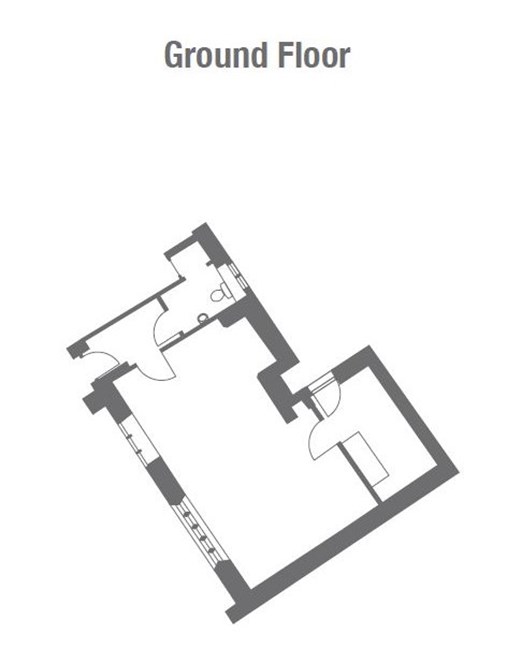
- The main room is approximately 8.2m x 4.8m. The kitchenette is 2.3m x 3.2m. The W.C. is 1.9m x 1.4m.
Accessibility
The whole space is on the ground floor and is accessible for those with limited mobility or using manually operated wheelchairs. Further information can be found in our Community Space Access Guide below.
How to find us
Address
Calverley Community Space, 20 Woodhall Road, Calverley, Pudsey, LS28 5NL
What3Words to the entrance door to the Community Space: ///glue.hits.slides
As featured on Hallshire.com. Directory of halls for hire.
Floor plan

Price
The community space hire pricing is subsidised by the Landmark Trust to enable more people to benefit from the space.
We offer a 25% discount for local community groups, and not for profit or charity organisations. This discount will be applied to your invoice when the booking is confirmed.
For bookers using the core rate we also offer a 25% discount if you make a recurring booking of five or more events in one booking. This discount can’t be used in conjunction with other offers.
|
|
Core rate |
Local community group* |
Not for profit/charity discount |
|
Hourly |
£25 |
25% discount |
25% discount |
|
Half day or evening (4 hours) |
£50 |
25% discount |
25% discount |
|
Full Day (More than 4 hours) |
£80 |
25% discount |
25% discount |
|
Recurring booking (5 or more booked at the same time) |
25% discount |
|
|
*Postcodes within the LS28, BD10, LS19, LS18 or LS13 area
Essential information
Can I access the space before or after my booked time?
No, your access code to unlock the door will only work during your booked time slot, so please book enough time to set up and pack down your event.
How many people can be in the Community Space at any one time?
The Space can be booked for up to 25 people.
Is there a garden or outside space?
There is a Community Garden at Calverley Old Hall which is available for the public to use during daylight hours. This is adjacent to the Community Space and can be used by hirers, however it does not comprise of exclusive access – members of the public continue to have free access throughout your hire. Full details about the Community Garden are here.
What are the bathroom facilities?
There is a W.C. with accessible features.
What are the kitchenette facilities like?
The kitchenette equipment provided does differ to that of a normal Landmark and a list of what is provided will be sent with your confirmation. There is a fridge, kettles and limited crockery and cutlery.
What is the mobile signal like?
To check up-to-date mobile network coverage in the area, visit signalchecker.co.uk. Due to the location and structure of many of our buildings, signal strength may differ to those indicated.
Is there WiFi in the Community Space?
Yes, the password is available in the space when you arrive. WiFi is provided for users of the community space on best endeavour - intermittent connection problems can occur and therefore the WiFi should not be relied upon.
Is there parking?
To the rear of the building there is one Community Space designated parking space. There is ample free on-street parking on the surrounding residential streets. We ask that all users park considerately for our neighbours.
How is the property accessed?
Via a track from the main road. You will be sent an access code to unlock the door as part of your booking confirmation.
Is there an accessibility guide?
Yes – you can download our detailed accessibility guide here.
Does the property allow dogs?
Only assistance dogs are permitted in the Community Space and Community Garden
Availability and booking
Book the Community Space
To make a booking:
1. Check the calendar below for availability
2. Click on the plus (+) symbol next to the date you wish to book
3. Follow the link to our HallMaster booking system where you can follow the instructions to create an account and submit your booking request
4. We will then confirm the booking via email within three business days.
Please provide as much detail as possible in your event description to ensure we are able to accept your booking without delay.
Whilst we will do all we can to accept bookings on less notice, we recommend requesting your booking at least two weeks in advance of your hire date to avoid disappointment.
As a community space we hope that this space will be cared for by all our users as if it were their own. Please plan time in your hire to clean all rooms including the kitchenette and toilet at the end of your hire, empty bins and leave the space in the condition you would hope to find it for the next user.
Public or Private hires
When requesting a booking on Hallmaster you can select the privacy level of your booking.
- Private: This is the default setting. The Calendar will only show 'Private Event' for this booking and will not display any customer or event details.
- Public - Contact Details Hidden: The Calendar will show the Event name and description, but the contact details of the person making the booking will remain hidden.
- Public: The Calendar will show the event Name and description, plus contact details of the person making the booking or running the event, once the booking has been confirmed by an administrator.
If you are hiring the event for a public event, we recommend selecting one of the public options, this will allow the local community and potential participants to find your event on this calendar. If you include full event information, timings and booking details in your event description, they will be able to access the necessary information to take part in your event.